Introduction
A table helps to organize data information into columns and rows.- The element table defined an HTML5 table.
- The attribute summary not only summarizes the table's contents but also helps users with visual impairments to access the content through speech devices.
- The attribute border specifies the border of the table.
- The element caption is used to indicate the table's title.
- The element tr indicates table row
- The element td includes table data
- There are other elements such as thead, th, tbody, tfoot, colspan and rowspan will be illustrated later.
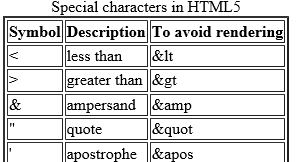
An HTML5 example of how to create a simple table is shown here:
<!DOCTYPE html>The rendered table example is shown here:
<!--Example 1: Table.html -->
<html>
<head>
<title> This is a Simple Table example </title>
</head>
<body>
<table border = "2">
<caption>Special characters in HTML5 </caption>
<tr>
<th> Symbol </th><th> Description</th> <th> To avoid rendering </th>
</tr>
<tr>
<td> < </td><td> Less than </td><td> & lt </td>
</tr>
<tr>
<td> > </td><td> Greater than </td><td> & gt </td>
</tr>
<tr>
<td> & </td><td>ampersand</td><td> & amp </td>
</tr>
<tr>
<td> " </td><td> quot </td><td> & quot </td>
</tr>
<tr>
<td> ' </td><td> apostrophe </td><td> ' </td>
</tr>
</table>
</body>
</html>