Introduction
HTML5 has a more simplified syntax compared to its predecessor where new element have been added and others were removed.The following are the newly added elements unless mentioned otherwise:
- <canvas> element is used for 2D drawings via scripting, mainly JavaScript. Here is an example of an HTML5 Canvas:
				<!DOCTYPE html>

				<!--Example: Canvas.html -->

				<html>

				<head>

				<title> Canvas example </title>

				</head>

				<body bgcolor="#ffffee" aLink="#0000ff" link="#0000ff" text="#000000" vLink="#0000ff" >

					<font face="times" size="+2" >

					< canvas id="canvas1" width="200" height="100" style="border:3px solid #000000;"> </canvas >

				</body>

				</html>
-
Please note that the following HTML tags are deprecated and CSS code is needed:
	                    ....bgcolor="#ffffee" aLink="#0000ff" link="#0000ff" text="#000000" vLink="#0000ff"
		                .....font face="times" size="+2"
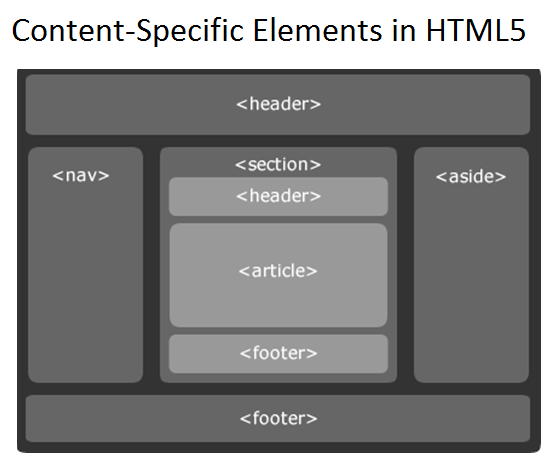
- content-specific elements including <article>, <header>, <footer>, <nav>, <section>
- <menu> and <figure>elements
- Content-specific elememts are shown here:
- Enables local web storage greater than 5MB within the user's browser
- There are two objects for storing data on the client's machine:
- localStorage: Stores data without any expiration date
- sessionStorage: Stores data for one session only once the user closes the browser window
- Application Cache: Allows to cache the a web application even without an internet connection. The advantages are:
- Offline browsing, cached pages load faster, and reduces server load and allows the browser to download only updated pages from the server
- The manifest attribute is used to specify offline browsing and the recommended file extension for manifest files is ".appcache"
- example: <html manifest="example.appcache">
- MANIFEST file is text file instructing the browser what to and not to cache. It has three sections
- CACHE MANIFEST: All files that are listed under this header will be cached once they get downloaded for the first time
- NETWORK: All files that are listed under this header will need a connection to the server and will never be cached
- FALLBACK: All files that are listed under this header require fallback pages in case a page is not accessible
- An example of MANIFEST file is shown below :
CACHE MANIFEST
Thi file instructs the browser to perform the following tasks:
/Web/theme.css
/Web/logo.jpg
/Web/main.js
NETWORK:
help.asp
*
FALLBACK
/Web/Guide/Readonly.txt
- Download three files from the Web folder of the website and will be always available even without internet connection
- Never cache the file "help.asp" and the symbol * specifies that all other files need an internet connection
- The FALLBACK section indicates that the file "Readonly.txt" will be accessed instead of all files in the Web/Guides folder in case of no internet connection
The Canvas example mentioned above is shown on a browser as follows: